

LATERAL CHROMATIC ABERRATION
IMPLEMENTATION
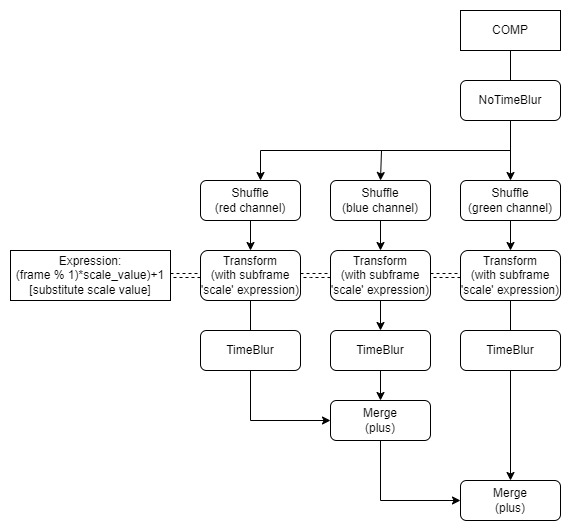
Since lateral chromatic aberration consists in a difference in magnification of the channels towards the periphery of the frame, using the 'scale' value from a Transform Node and the subframe workflow to obtain a progressive effect fits perfectly here. If we set the 'center' of the transform to the center of the frame, naturally the effect will become progressively stronger the further away from it. This time, we will set the following Expression to the 'scale' knob: ((frame % 1)*scale_value)+1 - substitute scale_value, which determines the strength of the blur effect. We might set a positive value for one of the channels (e.g. 0.01) and a negative one for the other (e.g. -0.015). Depending on the resolution, very small values might be sufficient, as the magnification increases quite drastically with each step away from the center. We shall again Shuffle each channel individually and combine them back together with a Merge 'plus' operation, as to offer us as much freedom as possible. In the case of lateral chromatic aberration, magnification might occur in all the three channels regardless of which one is more in focus.