

LONGITUDINAL CHROMATIC ABERRATION
IMPLEMENTATION
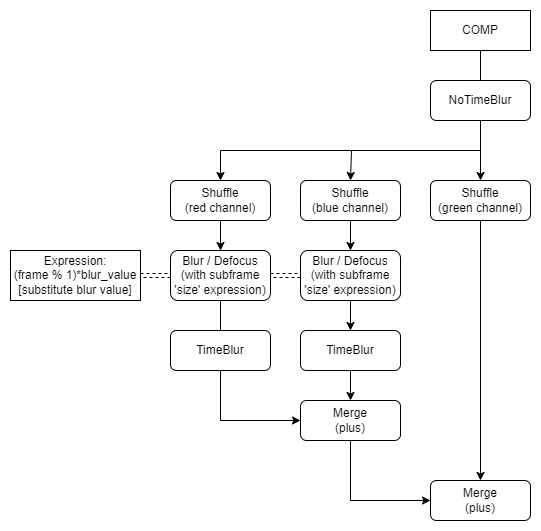
As longitudinal chromatic aberration consists of at least one of the channels (red, green, blue) being slightly out of focus compared to the others, an implementation is simple. We will make use of a Defocus or Blur Node for each channel individually and again employ the subframe workflow in order to obtain a nice gradual diffusion out of it. For this, we will set the following Expression to the 'size' knob: (frame % 1)*blur_value - substitute blur_value, which determines the strength of the blur effect. As this phenomenon affects the entire frame, there is no need to mask it in any way. It is usually more visible on the edges of focused elements against out of focus, which our approach shall automatically deliver, as any element that is in focus is automatically blurred more than the out of focus due to frequency separation. I recommend to Shuffle each channel separately and then combining them back together with a Merge 'plus' operation, as to have the freedom to do any necessary adjustments outside of just merely blurring.
One approach to know which of the channels is in focus might be to check the dominant hue in our focused element, therefore inferring which wavelengths are primarily in focus. Even though, for illustration purposes, the green channel as been chosen as focused in this example, in reality any combination of the three channels is possible, although theoretically at least one of the channels should be in focus (as we have seen some lenses are capable of focusing two or even three channels altogether, greatly reducing any amount chromatic aberration).