

SPHERICAL ABERRATION
IMPLEMENTATION
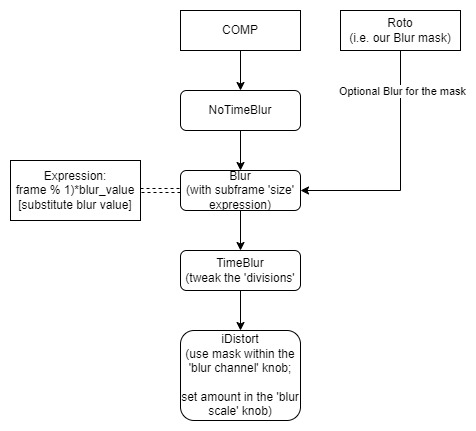
To implement spherical aberration, we will build upon the previous iDistort setup from the Field Curvature aberration, as we also require a gradual effect and a softening towards the periphery. However, this time we will also need to have at least a slight softness in the center (since this phenomenon affects the whole image, although it is stronger at the periphery). Thus, we shall build our blur mask in a way that it slightly covers the center of the frame. To simulate the slight light diffusion present in the spherical aberration effect, we will make use of a Blur Node using the subframe workflow followed by a TimeBlur Node, prior to the iDistort. For this, we will connect the blur mask to the Blur Node and set the following Expression: (frame % 1)*blur_value - subsititute blur_value, which determines the strength of the blur effect. In the TimeBlur Node, tweak the 'division' slider which will affect the diffusion of the effect.